Welcome to the Solutions Hub for Ohio Society of CPAs Knowledge Hub
We're excited to have you on board. This guide will help you get started with your advertiser account.
Shortly after signing up, you should receive an email invitation to create your account.
- The subject line will read: "You were invited to join Ohio Society of CPAs Knowledge Hub."
- The email will come from: Lead Marvels [dashboard@leadmarvels.com]
When you receive the email:
- Open the email and click the "Create Account" button to get started.
- This will take you to a secure page where you'll set your password.
If you do not receive the welcome email ...
- Check your spam or junk folder to see if the email was filtered there.
- If you still can't find it, please contact our support team for assistance.
- We can resend the invitation email to you.
Setting your Password
Once your password is set, you'll be redirected to your advertiser dashboard. This is where you'll manage
everything related to your Solutions Hub presence, including your company page, content resources, and
your lead reporting dashboard.
Your Dashboard
Keep your dashboard within reach
Bookmark your dashboard login page so you can easily return to it whenever you need to.Build Your Company Details
Start by filling out your company's details. This includes your company name, logo, description, and contact information.
This is part of the information your company needs to activate for display in the Solutions Hub.
Add your Company Info
What makes a great company description?
Write with clarity and purpose. A strong description tells visitors what you do, who you serve, and your unique strengths in plain, approachable language.Skip the buzzwords and focus on what matters most to your audience. Aim for 2-3 short paragraphs that answer: "How do we solve problems for these specific members?"
Select Your Business Categories
Business categories help association members find the right solutions faster. The categories you
select will determine where your company appears in search results and filter views across the Solutions Hub.
You'll be prompted to select a number of categories based on your purchase plan.
Choose categories that align with your core value proposition and the specific needs of this association's members. For example, if you offer both consulting and software but your primary focus for this audience is software, prioritize software-related categories.
Select your Business Categories
You'll be prompted to select a number of categories based on your purchase plan.
Choose categories that align with your core value proposition and the specific needs of this association's members. For example, if you offer both consulting and software but your primary focus for this audience is software, prioritize software-related categories.
Be Discoverable
Review the full category list before making selections. Categories that seem similar might have important distinctions. When in doubt, put yourself in the shoes of a potential client searching for your solution.Add Social Media Links
While optional, adding your company's social media links is a simple way to give visitors additional ways to learn about your brand and engage with you.
When members browse your company page, they'll see icons linking directly to the profiles you include here. This makes it easy for them to explore your content, follow your company, or reach out through their preferred channels.
You can include any of the following:
Set your social media links
When members browse your company page, they'll see icons linking directly to the profiles you include here. This makes it easy for them to explore your content, follow your company, or reach out through their preferred channels.
You can include any of the following:
- Twitter / X
Prioritize quality over quantity
If you have limited resources for social media management, focus on the platforms where you share industry-relevant content most consistently. A regularly updated LinkedIn page is far more valuable than four inactive accounts. Most professionals turn to LinkedIn specifically for business-related insights and connections, making it a natural fit for B2B visibility.Build Your Company Page
Your company page is the heart of your Solutions Hub presence. It's where association members learn
who you are, what you offer, and why they should engage with you. Think of it as your digital
storefront within a trusted digital ecosystem that your audience already values. A well-crafted page
reinforces your credibility, improves discoverability, and drives more meaningful engagement.
We call each section you can add to your company page an "engagement". Engagements can include contact info, an about section, resources, testimonials etc.
We call each section you can add to your company page an "engagement". Engagements can include contact info, an about section, resources, testimonials etc.
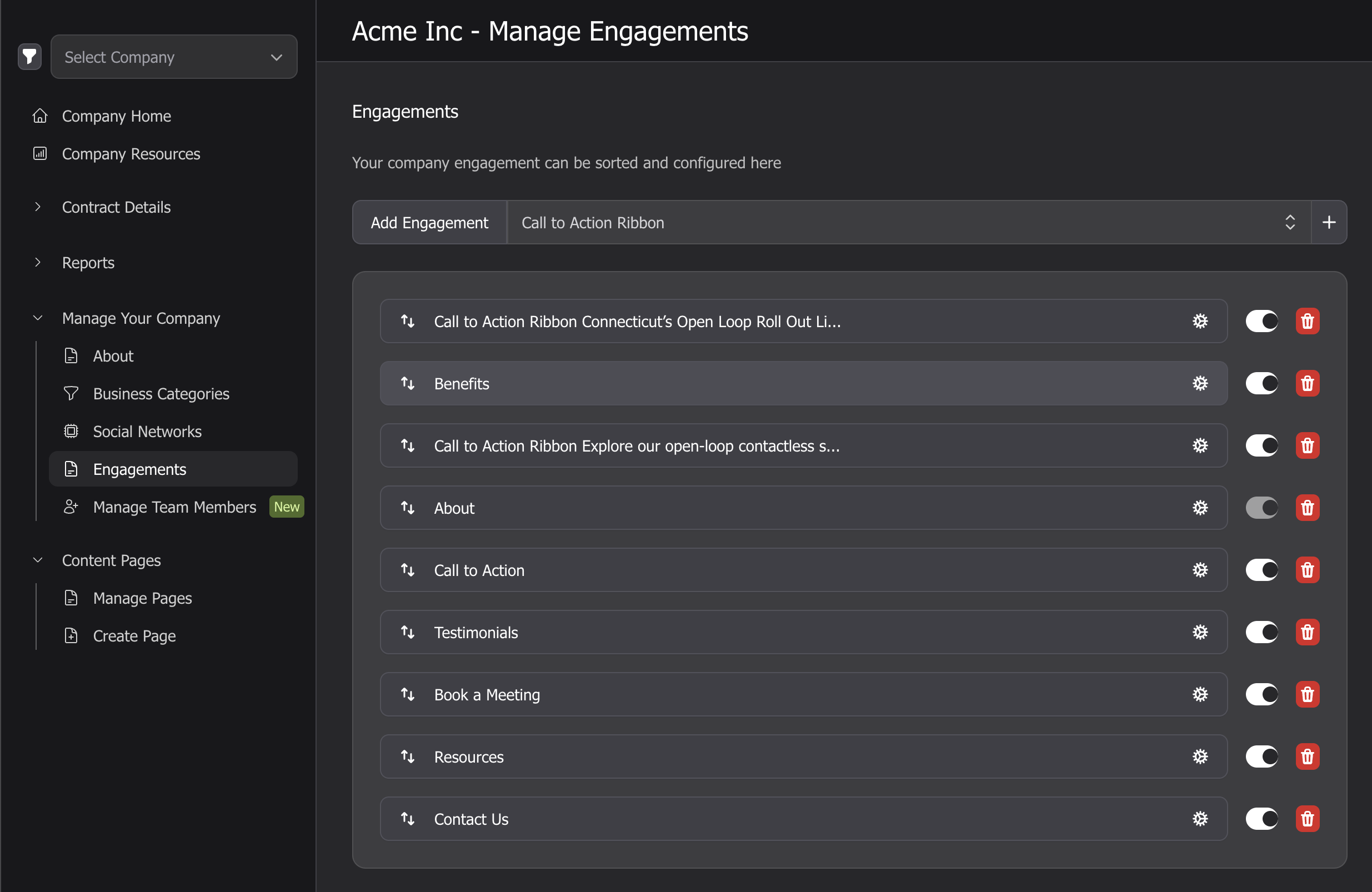
Configure engagement modules
The more modules you activate, the more opportunities you create for visitors to engage with your brand. We recommend implementing modules that align with your available content and marketing goals.You can update your selections at any time, so start with what you're ready to showcase now and expand later.
Here's a quick overview of what's available:
- About - Displays your company description and contact info. Always on — this is the foundation of your company page.
- Benefits - Highlights what sets your solution apart. Great for showcasing your unique value or key differentiators.
- Book a Meeting - Allows visitors to schedule via your calendar link. Ideal if you want to drive 1:1 conversations or demos.
- Call to Action - Adds a customizable CTA button (e.g., “Download Now,” “Start Free Trial”).
- Call to Action Ribbon - Shows a colored ribbon prompting the visitor to click the CTA button.
- Contact Us - Shows a form visitors can use to reach out. Use this if you don’t have a dedicated CTA but want to invite contact.
- Contacts - Displays headshots, titles, and contact info for key team members. Adds a human touch.
- Resources - Lists your company's resources like white papers, guides, or videos.
- Testimonials - Features customer quotes or reviews. Great for building trust and social proof.
- Watch Video - Embeds a video player right on your page. Ideal for explainers, product demos, or customer story videos.
Adding Content Pages
Each piece of content you submit will live on its own dedicated landing page, giving it space to
stand out, drive engagement, and generate leads if lead capture is part of your program.
There are three main components to each content page:
- Information — The lead-generating asset(s) your audience will access, such as a white paper, checklist, or guide.
- Teaser Card — A clickable preview that appears in search results draw visitors into your page.
- Landing Page — The landing page template makes it easy to present your lead-magnet content in a visually compelling, user-friendly format.
Things to keep in mind:
Create a content page
- Save a draft as you go - You can save your work as a draft at any time. This allows you to come back and finish it later without losing your progress.
- Resource Type - The default resource type for most vendors is "Marketing Content." If you are creating a resource for a Lead Generation program, you will have the option to select "Lead Generation Content", which will add a form that members must fill out to access your content. You will not be able to change this once selected.
- Page Approval - When you click the "Save and Publish" button, the resource will be submitted for review. Ohio Society of CPAs Knowledge Hub will check it to ensure it meets quality standards and aligns with the Solutions Hub guidelines. After the review, you will no longer be able to edit the content of the page.
Why Your Content Matters
Think of your downloadable resource as the handshake that starts the relationship. High-quality content not only helps generate qualified leads, it also reflects your brand.When the content delivers real value, it builds trust, reinforces your credibility, and makes it more likely that prospects will want to keep engaging with your company. Invest the time to make it good. It’s doing the talking when you’re not in the room.